Touchless order processing allows eligible customer orders to move from receipt to ERP creation without routine data entry or field-by-field review. For manufacturers and distributors, the goal is not to eliminate people from every order. It is to automate predictable work while directing ambiguous, incomplete, or commercially sensitive orders to the right employee.
That distinction matters. An order can be easy to read but unsafe to process automatically because the customer, item, unit, price, address, or requested date conflicts with ERP data or business rules.
This guide explains how to define touchless eligibility, build validation gates, manage exceptions, and introduce straight-through processing without weakening operational control.
What is touchless order processing?
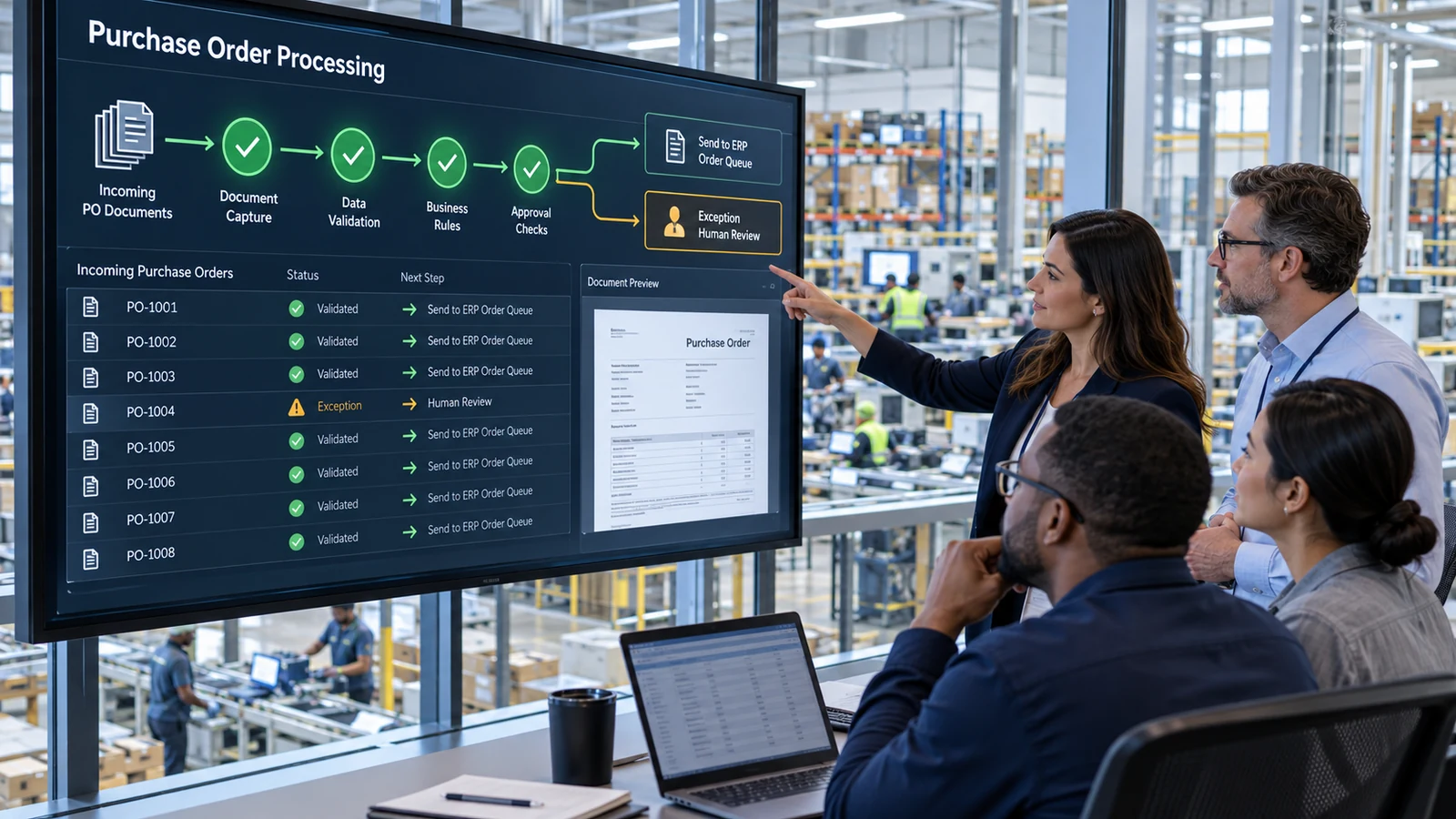
Touchless order processing is a controlled workflow in which an incoming customer purchase order is captured, interpreted, matched, validated, and created in the ERP without normal human intervention.
A complete flow may include:
- Receive the order from email, upload, portal, spreadsheet, PDF, or scan
- Identify the document and customer
- Extract header and line-item values
- Match those values to ERP master data
- Apply validation and commercial rules
- Detect duplicates and revisions
- Determine whether human approval is required
- Create the ERP sales order
- Record the source document and processing history
The word “touchless” should describe the path of an eligible order—not a promise that every order will bypass review.
The automated order entry guide provides a broader view of the complete purchase-order-to-ERP workflow.
Why touchless should be an outcome, not a starting requirement
Making every order touchless creates the wrong incentive. Teams may lower validation thresholds, ignore difficult scenarios, or treat manual review as failure.
A safer objective is:
Process orders automatically when the organization has enough document confidence, master-data certainty, business-rule coverage, and ERP control to do so.
Orders that fail those conditions should enter a structured exception workflow. Human review is valuable when it resolves uncertainty, applies judgment, or approves a business decision. It is wasteful when an employee simply retypes data that has already passed every relevant check.
Define touchless eligibility explicitly
Eligibility rules determine which orders can proceed automatically. They should be understandable, testable, and owned by the business.
An initial policy might require:
- A recognized and active customer
- An approved sold-to and ship-to relationship
- A supported document format
- A unique purchase-order number
- Complete required header fields
- All items matched to active ERP records
- Approved units and conversions
- Pricing within the applicable rules
- No restricted items or special approval requirements
- Valid requested dates
- No unresolved duplicate or revision indicators
- Successful ERP validation
- Order value within an authorized threshold
Eligibility can vary by customer, order type, business unit, product, value, or channel. A long-established customer with stable item mappings may qualify before a new customer with inconsistent documents.
Document the policy as a decision table rather than keeping it in project meetings or individual employee knowledge.
Separate document confidence from business validity
Document extraction answers: “What does the purchase order appear to say?”
Business validation answers: “Can the organization accept and create this order as proposed?”
These are different questions. A system may read a quantity of 10 with high confidence, while the ERP requires the item to be ordered in cases of 12. It may correctly read a price that conflicts with the current contract or identify an address that is not an approved delivery location.
A touchless decision therefore needs both:
- Document confidence: the required values were captured clearly
- Business validity: the values satisfy ERP, commercial, and operational rules
The purchase order data extraction guide explains how document reading becomes structured ERP-ready data.
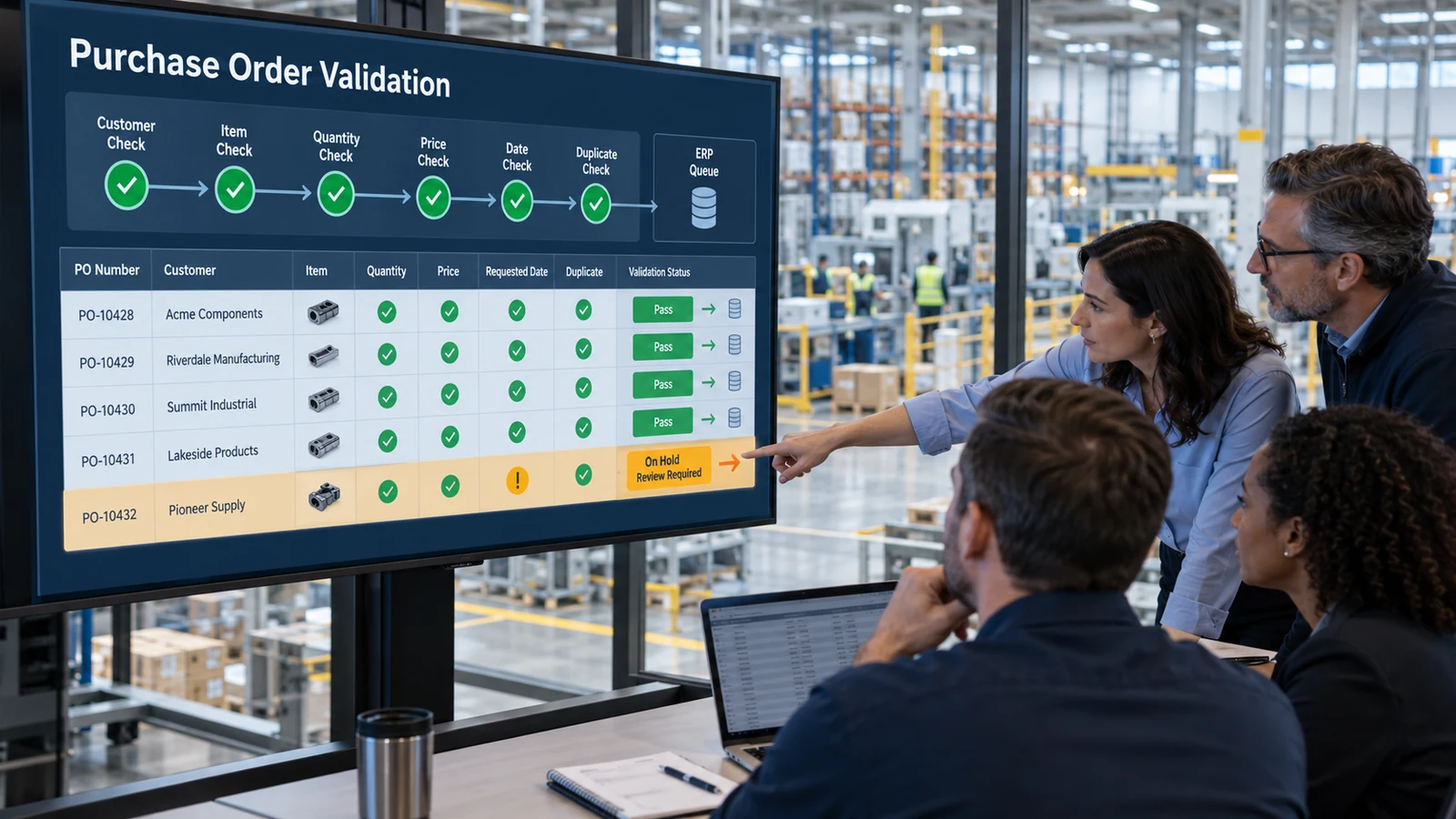
Build the workflow around validation gates
Validation gates allow an order to continue, stop, or enter review at defined points.
Customer and address gate
Confirm the correct sold-to, bill-to, and ship-to records. Check whether accounts are active and whether the selected delivery location is valid for the customer.
Product and unit gate
Resolve customer item numbers to internal ERP products. Verify status, unit of measure, packaging, and approved conversion rules.
Commercial gate
Evaluate currency, price source, discounts, payment terms, order value, and any required commercial approval.
Date and fulfillment gate
Interpret requested ship or delivery dates and identify conditions that require planning or customer-service review.
Duplicate and revision gate
Compare purchase-order references and relevant document details with existing records. A repeated PO number may be a duplicate, a correction, or a legitimate order under a customer-specific convention.
ERP transaction gate
Confirm that the ERP accepts the proposed order and that the transaction completed exactly once. Timeouts and retries must not create duplicates.
The purchase order validation checklist offers practical tests for each major data area.
Make master-data matching reliable
Customer purchase orders rarely use ERP terminology consistently. Touchless processing depends on relationships between external references and internal records.
Important mappings include:
- Customer names and account numbers
- Sold-to and ship-to combinations
- Customer item numbers
- Internal product numbers
- Manufacturer or catalog references
- Units and packaging
- Currency
- Price source
- Sales organization
- Warehouse or fulfillment location
Mappings should have owners, approval rules, effective dates when needed, and a history of changes. A reviewer’s correction should not automatically become a permanent mapping without control.
Poor master data often appears as an automation problem. Tracking unresolved and frequently corrected mappings can reveal where maintenance will improve both touchless eligibility and manual order entry.
For a deeper framework, see order entry mapping for ERP.
Design exceptions as part of the automated process
Touchless processing is only dependable when exceptions are handled well.
An exception should include:
- Original email and purchase order
- Proposed value
- Expected ERP value or applicable rule
- Reason for the exception
- Affected field or line
- Current owner
- Available resolution actions
- Age and priority
- Processing and approval history
Route exceptions by cause. Master-data teams should not receive pricing approvals, and IT should not own a missing customer reference.
Useful categories include:
- Document quality
- Customer or address
- Product mapping
- Unit or packaging
- Price or discount
- Requested date
- Duplicate or revision
- Approval
- ERP or integration failure
The sales order exception handling guide explains queue design, ownership, escalation, and root-cause analysis.
Protect the ERP integration
Straight-through processing increases the importance of integration controls because fewer employees inspect each transaction before creation.
Define:
- Whether automation creates a draft, blocked order, or released order
- Which order types and fields are supported
- How ERP validation messages return to the workflow
- How credentials and permissions are restricted
- How timeouts and retries are handled
- How duplicate creation is prevented
- How ERP downtime affects incoming orders
- Who monitors failed transactions
- How source documents and transaction history are retained
Use idempotent transaction behavior where the integration supports it: the same order event should not create multiple ERP orders when a response is delayed or a retry occurs.
The AI sales order automation and ERP integration article covers the relationship between the automation layer and existing systems.
Introduce automation in controlled levels
A staged approach provides evidence before review is reduced.
Level 1: Extract and compare
Capture order data and compare it with what employees enter manually. Do not create ERP records automatically.
Level 2: Create proposed orders
Prepare structured order records for complete review. Employees confirm every field and submit the order.
Level 3: Review only exceptions
Allow validated fields to pass while reviewers focus on failed, uncertain, or approval-required conditions.
Level 4: Create controlled ERP drafts
Eligible orders create ERP drafts automatically. Employees review through an ERP or operational queue before release.
Level 5: Touchless creation for approved scenarios
Only defined customers and order types proceed without routine review. Monitoring and exception handling remain active.
Moving between levels should depend on observed performance, not a fixed calendar date. The order entry automation implementation guide provides a full rollout plan.
Choose the first touchless segment carefully
The best first segment is rarely “all easy orders.” Define it precisely enough that results can be measured and repeated.
A practical starting segment may have:
- Stable order volume
- Consistent documents
- Mature customer-item mappings
- Limited unit complexity
- Clear pricing logic
- Few special approvals
- Experienced process owners
- Representative exceptions for testing
Do not exclude every difficult example from the pilot. Include duplicates, revised orders, missing values, price differences, new ship-to addresses, unsupported files, and ERP failures. The goal is to prove that unsafe orders stop correctly, not only that clean orders pass.
Email-based workflows also need controls for attachment selection, forwarded threads, multiple orders, and resubmissions. Review the email order automation guide when the shared inbox is the primary intake channel.
Measure safety and operational value together
A high touchless rate is not automatically a good result. It can rise because eligibility improved—or because controls became weaker.
Track measures such as:
- Orders eligible for touchless processing
- Orders completed touchlessly
- Review and exception rate
- Exceptions by cause and customer
- Critical-field correction rate
- First-pass ERP creation
- Duplicate attempts detected
- Post-creation changes
- Processing and waiting time
- Failed transactions and retry outcomes
- Customer-service escalations
- Manual fallback usage
Review the reasons orders do not qualify. Some causes require better mappings or rules; others represent legitimate situations that should remain under human control.
For financial evaluation, use the order entry automation ROI guide to connect measured time, exceptions, rework, and implementation costs.
Maintain governance after go-live
Eligibility rules, customer formats, ERP configuration, products, pricing, and employees change over time.
Establish a regular review for:
- New or changed mappings
- Rule overrides
- Customers entering or leaving touchless eligibility
- Recurring exception categories
- Post-creation corrections
- ERP releases and configuration changes
- Access and permission reviews
- Integration failures
- Source-document retention
- Model or extraction changes
When a serious error occurs, pause the affected scenario without stopping the entire workflow. Controls should be granular enough to isolate one customer, format, rule, or order type.
Evaluate software against the full workflow
When comparing platforms, test more than extraction accuracy.
Ask whether the software supports:
- Multiple intake channels and document types
- Customer-specific mappings
- Configurable validation and approval rules
- Explainable eligibility decisions
- Structured exception queues
- Source evidence beside proposed values
- Controlled ERP creation and retries
- Role-based access and audit history
- Performance reporting by customer and exception
- A gradual path from review to touchless processing
Use real customer documents and expected ERP outcomes during evaluation. The sales order automation software buyer’s guide provides a broader scorecard.
Make touchless processing earned, not assumed
Touchless order processing works when automation earns the right to proceed through clear evidence: reliable capture, approved master-data matches, successful business validation, controlled ERP behavior, and no unresolved exception.
That approach preserves the speed advantage of straight-through processing without pretending that every order is predictable. Manufacturers and distributors can automate routine work while keeping people focused on the decisions, relationships, and unusual conditions that require judgment.