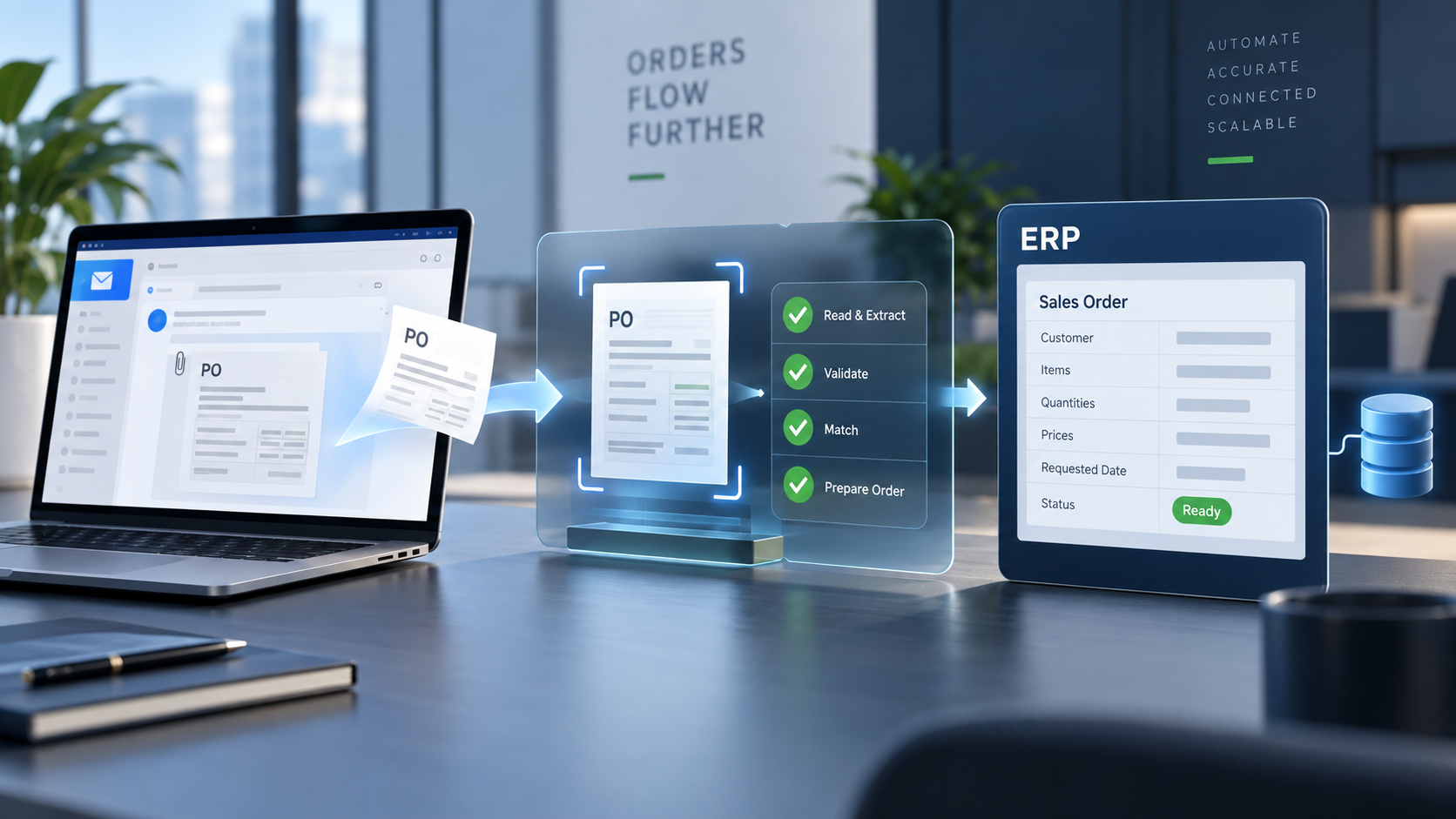
Many B2B sales orders still begin with an email.
A customer sends a purchase order as a PDF, spreadsheet, scanned document, or message in the email body. Someone opens it, identifies the customer, copies line items into the ERP, checks prices and product codes, and sends the order for approval.
The process looks simple, but it creates repetitive work and avoidable risk. A wrong quantity, delivery address, unit of measure, or product code can delay fulfillment and damage a customer relationship.
AI sales order automation handles the repetitive part of this workflow while keeping the ERP as the system of record.
What is AI sales order automation?
AI sales order automation is the process of using document recognition, business rules, and ERP integrations to convert incoming customer purchase orders into structured sales orders.
A typical system can:
- Monitor a shared order inbox
- Identify new purchase orders and attachments
- Extract customer, product, quantity, price, and delivery information
- Match extracted values against ERP master data
- Flag missing or uncertain fields
- Create a draft sales order in the ERP
- Route exceptions to a person for review
- Preserve the original email and document for traceability
The goal is not to remove control. It is to reduce manual entry while giving employees a clear place to review exceptions.
How the workflow works
1. A customer sends a purchase order
The order can arrive through email, an upload form, or another agreed channel. The system stores the original message and attachments so the source remains available during review.
2. The document is classified
The automation determines whether the file is a purchase order and identifies its format. It may receive a clean digital PDF one day and a scanned document with a different layout the next.
Traditional templates often depend on fixed positions. AI-assisted extraction can work across varying customer formats because it identifies the meaning of fields rather than relying only on coordinates.
3. Order data is extracted
The system converts the document into structured fields such as:
- Customer name and account number
- Purchase order number
- Order and requested delivery dates
- Billing and shipping addresses
- Product numbers and descriptions
- Quantities and units of measure
- Agreed prices, discounts, and currency
- Shipping instructions and customer notes
Every extracted value can include a confidence level. Low-confidence fields are highlighted for review instead of being accepted silently.
4. The data is validated against the ERP
Extraction alone is not enough. The order must be checked against the data already stored in the ERP.
Validation can confirm:
- The customer exists and is active
- The delivery address belongs to the customer
- Product numbers map to valid items
- Units of measure are allowed
- Pricing follows the relevant agreement
- Quantities meet packaging rules
- Required fields are present
- The purchase order has not already been processed
This step turns document capture into a reliable business process.
5. A draft sales order is created
After validation, the integration sends structured data to the ERP. The safest initial setup creates a draft or blocked order that an employee reviews before release.
Clean orders can later move through a faster approval path. Orders with mismatches remain in an exception queue with the original document and a clear explanation of what needs attention.
6. The outcome is tracked
The system records what was extracted, what was changed, who approved it, and which ERP order was created. This creates an audit trail and helps the team identify recurring customer or product-data issues.
How does the ERP connection work?
The integration method depends on the ERP and how it is hosted.
Cloud ERP
Cloud ERP systems commonly provide APIs for reading master data and creating transactions. The automation authenticates securely, requests the data it needs, and submits the validated sales order.
This approach can support near real-time synchronization without direct database access.
On-premise ERP
An on-premise ERP can still be connected. A lightweight connector runs inside the company network and opens an encrypted outbound connection to the automation service. Because the connector initiates the connection, the company usually does not need to expose its ERP directly to the public internet.
Depending on the ERP, the connector can communicate through:
- A supported ERP API
- Web services
- An integration middleware platform
- A controlled import queue
- A database staging interface approved by the ERP vendor
The exact approach should follow the ERP vendor's supported integration model.
Older systems and file-based imports
Some systems do not offer modern APIs. In those cases, the automation can generate validated CSV, XML, EDI, or other import files in the format the ERP expects.
File-based integration can still remove most manual entry, although feedback and synchronization may be less immediate than with an API.
What happens when the AI is unsure?
A production workflow should never hide uncertainty.
If the system cannot confidently match a product, customer, quantity, or price, it should stop that order and ask for review. The reviewer sees the source document next to the extracted values and can correct the affected fields.
Those corrections can improve future matching rules. The business remains in control, while the amount of routine work decreases over time.
Which orders should be automated first?
The best starting point is a narrow, measurable workflow.
Good candidates usually have:
- High order volume
- Repetitive manual entry
- Consistent master data
- A limited group of customers or products
- Clear validation rules
- Employees who currently spend significant time processing orders
A pilot can begin with one inbox, one business unit, or a small customer group. The team can measure processing time, correction rate, exception rate, and the percentage of orders completed without manual entry.
What should be measured?
Useful performance indicators include:
| Metric | What it shows |
|---|---|
| Average processing time | How long an order takes from arrival to ERP creation |
| Touchless order rate | Percentage of orders processed without manual correction |
| Exception rate | Percentage of orders requiring review |
| Field accuracy | Accuracy of customer, item, quantity, price, and address data |
| Cost per order | Labor and operating cost for processing one order |
| Order-entry backlog | Number and age of orders waiting for entry |
| Duplicate prevention rate | Duplicate orders caught before ERP creation |
These metrics create a baseline and show where additional automation will provide value.
Common implementation mistakes
Automating before cleaning master data
If customer accounts, product mappings, addresses, and price agreements are inconsistent, the automation will generate too many exceptions. Basic master-data cleanup should be part of the pilot.
Sending every extracted order directly to fulfillment
Automatic release is rarely the right first step. Start with draft creation and human approval. Expand automation after the workflow produces stable results.
Treating every customer format as a separate project
A solution built entirely around fixed document templates becomes expensive to maintain. Use flexible extraction combined with strong ERP validation.
Ignoring exception handling
The normal path may be automated, but the exception experience determines whether employees trust the system. Each exception should state what failed and what action is required.
Measuring only extraction accuracy
A field can be extracted correctly and still be invalid for the ERP. Measure the complete workflow, including matching, validation, order creation, and correction time.
Can the existing ERP stay in place?
Yes. AI sales order automation is an integration layer around the current order-entry process. The ERP continues to manage customers, products, prices, inventory, accounting, and fulfillment.
That makes order automation practical for companies that want faster processing without replacing a core business system.
A practical first rollout
A focused implementation can follow five steps:
- Map the current order-entry process and its most common exceptions.
- Select one inbox, customer group, or order type for the pilot.
- Connect the required customer, product, pricing, and address data.
- Create draft ERP orders with mandatory human approval.
- Measure results and expand only after the workflow is reliable.
The first objective should be a dependable process that saves time and catches errors. Higher automation rates follow once the data, rules, and integration have been proven.
Preparing for AI order automation
Before starting, collect a representative sample of purchase orders and document how employees resolve unclear fields today. Identify the ERP interfaces available, the approval rules that must remain in place, and the data required to create a valid sales order.
ORDVARO is being built to connect incoming purchase orders with existing ERP workflows, helping teams reduce repetitive order entry while retaining review, traceability, and operational control.